









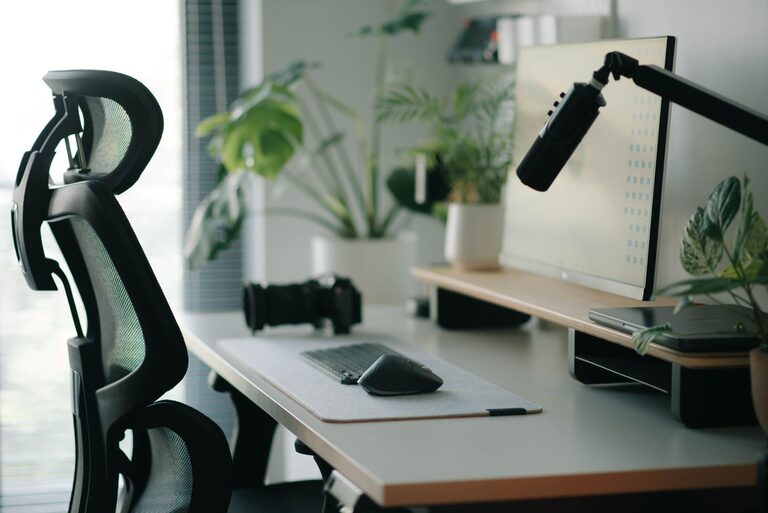
Whether you work from home, study online, or spend time on hobbies and entertainment, a comfortable workspace can make screen time more enjoyable. The right setup does not require expensive furniture or a large room. Small improvements to your chair, desk, lighting, and daily routine can create a space that feels more inviting and easier to use.
Start With the Right Location
Choose a workspace location that supports focus and comfort. A quiet corner, spare room, or section of a dining area can work well. If possible, select a spot with enough room to sit comfortably and move your arms without bumping into nearby objects.
Natural light can make a space feel brighter and more welcoming. However, avoid placing your screen directly in front of a bright window or with the window directly behind it. Strong light from either direction can create reflections and make the display harder to see.
Consider these location factors:
– Distance from noisy appliances or busy walkways
– Access to electrical outlets
– Enough space for your chair and feet
– A comfortable indoor temperature
– A background that helps you stay focused
– Room for a lamp or other useful accessories
If you share your home with others, a small sign, room divider, or pair of headphones can help communicate when you need quiet time.
Choose a Desk That Fits Your Needs
Your desk should provide enough space for your main screen, keyboard, mouse, notebook, and any other items you use regularly. A desk that is too small can feel crowded, while an oversized surface may encourage clutter.
Before buying a desk, measure the available area. Leave enough space behind the chair so you can pull it out and sit down easily. If you use more than one monitor, include both screens in your measurements.
The desk height should allow your arms to rest comfortably while you type. Your elbows should stay close to your sides rather than reaching far forward or upward. If the desk is slightly too tall, a properly adjusted chair and footrest may help you create a more comfortable position.
A height-adjustable desk can offer more flexibility, but it is not essential. A sturdy desk at a suitable height can work just as well for many home setups.
Select a Supportive Chair
A comfortable chair is one of the most important parts of a home workspace. Look for a chair with a seat that supports your body without feeling too firm or too soft. Adjustable height is useful because it allows you to position yourself in relation to the desk.
When sitting at your desk:
– Keep both feet supported by the floor or a footrest
– Let your shoulders rest naturally
– Keep your elbows near your sides
– Avoid leaning far forward for long periods
– Use the backrest for support
– Leave a little space between the edge of the seat and the backs of your knees
You do not need a specialized office chair to create a comfortable setup. A dining chair may work if it places you at the right height. Adding a separate cushion or footrest can also improve the fit.
Position Your Screen Carefully
Screen placement affects how easily you can view your work. Place the main screen directly in front of you to reduce the need to turn your head repeatedly. If you use two screens, position the screen you use most often in the center.
The screen should be far enough away that you can read comfortably without leaning forward. Many people find it helpful to place the top portion of the display around eye level or slightly below it. Adjust the position based on what feels natural to you rather than relying on a single exact measurement.
A monitor stand, sturdy shelf, or stack of books can raise a screen. Make sure the support is stable and does not block ventilation openings.
For a laptop, a separate keyboard and mouse can make it easier to raise the screen while keeping your hands at a comfortable level. This simple change can help prevent the laptop from forcing you to look downward for long periods.
Improve Lighting
Good lighting reduces the need to squint and helps your workspace feel more pleasant. Use a combination of natural light and indoor lighting when possible.
A desk lamp can provide focused light for reading, writing, or paperwork. Position it so the light shines on your work without reflecting directly off the screen. If you write with your right hand, place the lamp on the left side to reduce shadows, and reverse the arrangement if you write with your left hand.
Keep your screen brightness balanced with the surrounding room. A display that is much brighter than the room can feel harsh, while a display that is too dim may be difficult to read. Adjust brightness, text size, and contrast until the content is clear and comfortable.
Organize Cables and Supplies
A tidy workspace is easier to use and maintain. Start by removing items you rarely use. Keep frequently needed supplies within easy reach and store less-used items in a drawer, box, or nearby shelf.
Cable management can make a noticeable difference. Group cables with reusable ties, clips, or sleeves. Labeling cords at the power strip can make it easier to identify them later. Avoid pulling cables tightly, and leave enough slack for normal movement.
Useful organization ideas include:
– A small tray for notebooks and pens
– A stand for headphones
– A drawer for chargers and adapters
– A document holder for reference papers
– A cable box or clips along the back of the desk
– A small bin for scraps and packaging
A clear desktop does not have to look empty. Keep a few items that make the area welcoming, such as a plant, framed photo, or simple decoration.
Build Breaks Into Your Routine
Even a well-designed workspace can become uncomfortable if you remain in one position for too long. Add short pauses throughout the day to change position, look away from the screen, refill your water, or walk around the room.
Try setting a gentle reminder at regular intervals. During a pause, relax your hands, roll your shoulders, or stand while reviewing a message. The goal is not to follow a strict routine but to avoid staying still for hours without a change.
You can also vary your tasks. Alternate between typing, reading, phone calls, planning, and offline activities when your schedule allows. A timer, calendar reminder, or built-in focus feature can help make breaks easier to remember.
Personalize the Space
Comfort includes more than furniture and screen placement. Choose colors, textures, and accessories that suit your preferences. A soft floor mat can make a hard floor feel more comfortable, while curtains or a room divider can help manage glare and distractions.
Keep the workspace easy to reset at the end of the day. Return supplies to their usual places, close unnecessary tabs, and clear away cups or papers. A quick reset can make it easier to begin the next session.
Make Small Improvements Over Time
You do not need to redesign your entire workspace at once. Start with the adjustment that would make the biggest difference, such as raising a laptop, adding a lamp, or improving your chair height. Use the space for several days, then notice what still feels awkward.
A comfortable home workspace is the result of thoughtful choices and regular adjustments. By combining suitable furniture, balanced lighting, organized supplies, and regular movement, you can create a screen-friendly area that supports your daily activities without requiring a large budget or a separate room.